
Every supplier invoice, from the inbox to the books.
The AP Clerk picks up bills wherever they arrive, reads them, matches the supplier, codes each line to the right G/L account and enters the invoice in your accounting system. When it is not sure, it stops and asks a person.
Someone on the team spends hours a week opening PDFs, retyping supplier names, amounts and VAT, choosing an expense account and chasing duplicates. It is slow, it is boring, and the mistakes show up at month end.
 Outlook
 Dynamics 365 Business Central
 QuickBooks Online
 Google Chat
 Gmail
Runs on Dynamics 365 Business Central and QuickBooks Online today. Invoices arrive through Outlook, Google Chat or Gmail.
What the AP Clerk does.
Each step is either an automated action, an AI agent's judgement or a person's decision. You choose where the people are.
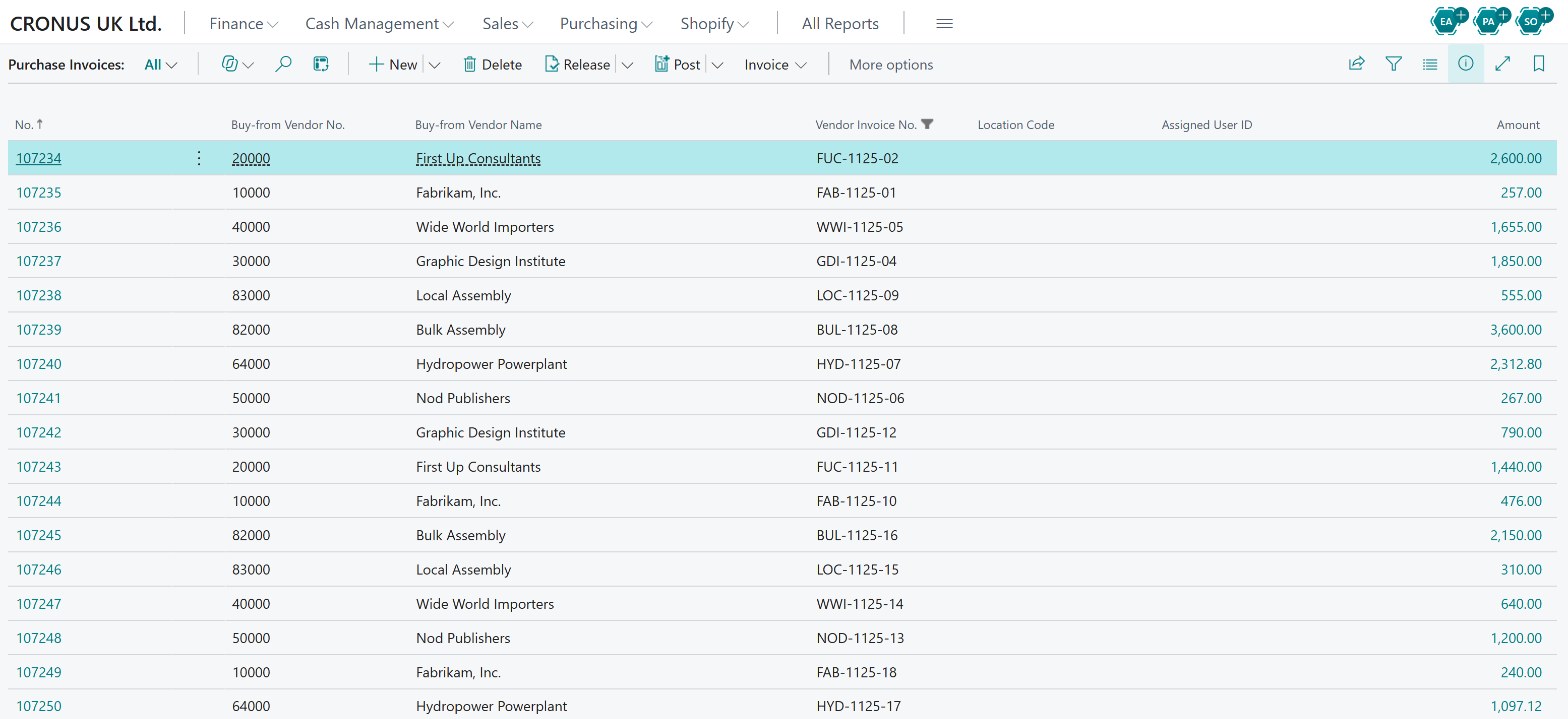
The 17 draft purchase invoices the AP Clerk entered in Business Central from 25 supplier emails (CRONUS UK demo company).
Finds the invoice
Reads the AP mailbox in Outlook (or a chat space). A PDF or a photo of a bill is enough.
Automated stepReads and understands it
Extracts supplier, invoice number, dates, lines, tax and totals, even from scans.
AI agentChecks against your books
Looks up suppliers, G/L accounts and recent invoices in Business Central, spots duplicates and unknown suppliers.
Automated stepCodes every line
Chooses the G/L account for each line, separates VAT and scores its own confidence.
AI agentAsks when unsure
Below the confidence threshold, for a new supplier or when the arithmetic does not add up, it waits for a person.
Person decidesEnters the invoice
Creates a draft purchase invoice in Business Central with the original PDF attached, checks the VAT total and emails a report.
Automated stepWatch the AP Clerk run.
The real AP Clerk flow, in its QuickBooks version: a Google Chat message starts it, the hub records the invoice, the AI agent codes it, QuickBooks receives the bill, and the chat gets a report. It loops for up to 30 rounds and parks for a person if something is off.
Case: 25 supplier emails into Business Central
We emailed 25 UK supplier documents to an AP mailbox and ran the AP Clerk against a Dynamics 365 Business Central company (the CRONUS UK demo). 17 were entered as draft purchase invoices with the right G/L accounts and the PDF attached, with no human touch. 5 went to a person: a blurry phone photo, a vague "services as agreed" line, an invoice whose lines did not add up, and 2 new suppliers. It stopped a byte-identical resend and a reused invoice number, and recognised a statement as not an invoice. On 7 drafts Business Central's VAT total differed from the printed one because those suppliers were set up without UK VAT, and the worker flagged each before posting. The same worker also runs on QuickBooks Online, where a 25-invoice run posted 18 bills with no human touch.
What people ask.
Does it post anything without approval?
Only what you allow. You set the confidence threshold and which suppliers or amounts always need a person. Everything else is posted and reported.
What if the invoice is a bad scan?
It reads scans and photos, but if a field cannot be read with confidence it asks rather than guesses.
Can it handle VAT and multiple currencies?
It reads tax lines and currency from the document and uses the tax codes set up in your accounting system.
Other jobs we take off your plate.
AR Collections Clerk
Reads open customer invoices in Business Central, ages them and drafts a polite reminder per overdue customer in Outlook for a person to send.
IT servicesClient Briefs
For IT service providers: reads each client's tickets, contract and devices in HaloPSA plus documentation in Hudu, and writes five briefs before the call.
SecuritySecurity Operations
A team of twelve security workers on one board: threat hunting, alert triage, attack surface, identity and cloud posture, detection engineering and more.
ComplianceCompliance Evidence
Collects evidence for ISO 27001, SOC 2 and Cyber Essentials controls straight from Microsoft 365 and your other systems, grades each control and explains every gap.
SalesSales Assistant
Enriches and scores new leads in Dynamics 365 Sales or HubSpot, explains each score on the record and drafts the first email in Outlook.
ResearchResearch and Monitoring
Reads the sources you care about every day, keeps what matters, rewrites it clearly and publishes a ranked digest. No repeats.
See a digital worker do your job.
30 minutes, on your own process. We show a worker running end to end and agree what a first pilot would prove.